
Remember Every Connection on X
Add private notes, tags, and todos to any X/Twitter profile. See your notes instantly when you hover — no extra clicks, and private by default.
Privacy-first: local by default, with optional cloud sync.
Sound Familiar?
012,000 following. Zero context.
You follow 2,000 people but can't remember why you followed half of them.
02Your biggest fan. A stranger.
The same person replies to everything you post — and you still can’t place them.
03Great chat. Gone in a week.
You met someone at a conference and a week later forgot all the context.
04Your network, unsearchable.
You track founders, journalists, and leads — but X has no tool to organize them.
XStickies turns your timeline into a personal CRM.
Watch the 30-Second Demo
Everything You Need
Powerful features, zero complexity.
Hover Card Notes
Hover over any user and your note pops up instantly. Edit in-place and press Ctrl+Enter to save.
Smart Tags
Categorize contacts with tags. Auto-complete from your existing tags makes organizing effortless.
Timeline Indicators
A small icon appears next to tweets from people you've noted — so you never miss context in your feed.
Follow-up Todos
Leave a todo on any profile to track next steps — outreach, replies, meetings. Check them off right from the management page.
Notes Management
Search, filter, edit, and bulk-manage all your notes from a dedicated management page. Import & export JSON.
Notes on Blocked & Muted
XStickies adds notes to blocked and muted profiles too — so when someone resurfaces, you know exactly why they weren't worth the follow.
Catch Up on X
Select multiple contacts and open their recent posts in one click. Stay up to date before meetings.
Privacy-First Sync
Local by default — nothing leaves your browser unless you sign in. Optional Google sign-in syncs your notes across your devices.
Matches Your X Theme
Automatically adapts to Light and Dark modes — seamlessly.
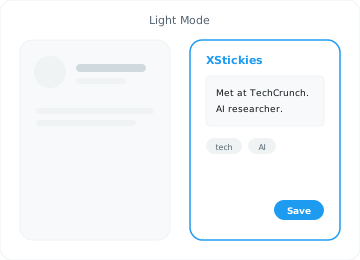 Light
Light
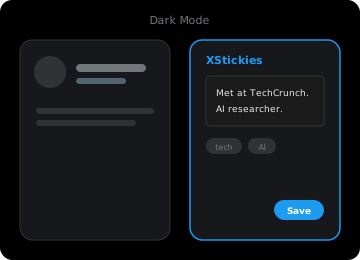 Dark
Dark
Built for Power Users
Investors & VCs
Track founders, note deal stages, and tag portfolio companies. Your X feed becomes your deal-flow dashboard.
Sales & PR
Remember what prospects care about. Add context before outreach so every DM feels personal.
Journalists & Researchers
Annotate sources, track story leads, and keep research notes right where the conversation happens.
X Power Users
Organize your social graph. Know exactly who everyone is the moment you see their tweet.
Influencer & Creator Outreach
Sourcing creators for collabs? Note who you've contacted and what you agreed on, then leave a todo for the next step — so no deal slips through.
Building in Public
Your audience lives on X. Remember your earliest supporters, active fans, and paying users — and reply to everyone with full context.
Get Started in Seconds
Install from Chrome Web Store
One click, zero configuration. Works immediately.
Hover Over Any User on X
The XStickies popup appears right next to the hover card.
Write a Note — It Auto-Saves
Add notes and tags. They're saved instantly — and sync across devices when you sign in.
Frequently Asked Questions
Is XStickies free?
Yes — XStickies is free to get started. Core notes are free: local notes, tags, and search cost nothing, and no credit card is required.
Can the person I note see my note? Will they be notified?
No. Notes, tags, and todos are completely private — they live in your browser (or your synced account) and are never posted, shared, or sent to anyone. The person is not notified, and nothing changes on their side. Only you can see what you write.
Where is my data stored?
By default, your notes stay in your browser. If you choose to sign in with Google, your notes are synced across your devices through our secure servers — and you can delete them at any time. See our Privacy Policy for details.
Does it work on mobile or in the X app?
Not yet. XStickies is a Chrome extension, so it works in desktop Chrome and Chromium-based browsers — the X mobile app doesn't support extensions. With sync enabled, your notes are ready on any desktop where you sign in.
What permissions does XStickies need?
On x.com it shows note popups and uses Storage to save your notes. If you opt into sync, it also uses Google Sign-In (Identity) and background Alarms. It cannot read your X password, DMs, or any data on other websites.
Will XStickies slow down X/Twitter?
No. XStickies is lightweight and only activates when you hover over a profile. It makes no network requests while you browse X — optional sync runs quietly in the background.
Can I export my notes?
Yes. Open the XStickies management page (click the extension icon) and use the Export button. All notes and tags are saved as a JSON file you can back up or transfer to another device. If you ever plan to uninstall, export first — or turn on sync so your notes are kept safe.
Does it work with other browsers?
Currently XStickies is designed for Chrome and Chromium-based browsers (Edge, Brave, Arc). Firefox support may come in the future.
Can I track follow-ups or todos for each person?
Yes. Along with notes and tags, you can add todos to any profile — handy for influencer outreach, lead follow-ups, or collab reminders. The management page shows everyone with unfinished todos, and you can check items off right from the list.
Can I add notes to blocked or muted accounts?
Yes. XStickies adds a notes section to blocked and muted profiles too, so you can record why you blocked or muted someone. If they ever resurface, your note is right there.
Ready to Remember Everyone?
Built for people who live and work on X. Start building your private relationship memory.
Free to get started. No sign-up required. Privacy-first.